




When bringing an app idea to life, confusion often arises between two essential early-stage tools: the prototype and the Minimum Viable Product (MVP). Both play critical roles in product development but serve different purposes and audiences. Understanding their differences can save you time, money, and frustration while setting the right expectations for your project’s progress.
What Is a Prototype?
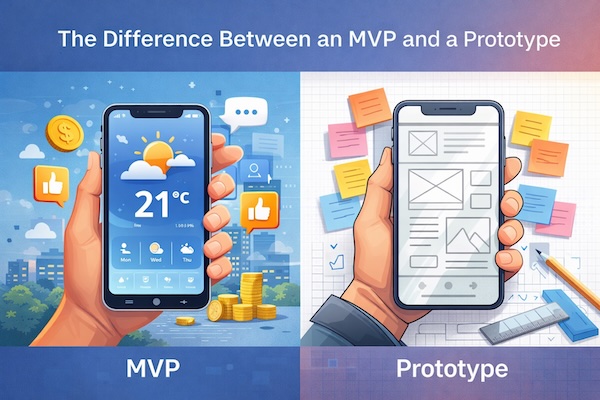
A prototype is an early, often simplified version of your app used to visualize and validate ideas quickly. It’s not a working product but rather a visual or interactive model—think wireframes, mockups, or clickable designs. The goal is to explore concepts, gather early feedback, and clarify user experience before investing in development.
Key aspects of prototypes:
- Focus: Design and user flow
- Functionality: Limited or non-working features
- Audience: Stakeholders, designers, potential users for feedback
- Tools: Figma, Sketch, Adobe XD, InVision
For example, if you are building a new mobile app for booking fitness classes, a prototype might include screens showing how users browse classes and schedule sessions, but it won’t connect to any backend or support real bookings.
Understanding the MVP
An MVP, or Minimum Viable Product, is a functional version of your app built with the essential features that solve a core problem for users. Unlike prototypes, MVPs are live products that users can interact with, providing real-world feedback and data to validate your business assumptions.
Key aspects of an MVP:
- Focus: Core functionality that delivers value
- Functionality: Working features, but minimal beyond essentials
- Audience: Early adopters, paying customers, real users
- Tools: Can be built with various development platforms, including no-code options like Bubble or Webflow
Continuing the fitness app example, the MVP would let users actually sign up, book fitness classes, and receive confirmations—basic features needed for the app to function as intended.
Why Both Matter in Different Stages
Prototypes and MVPs fit at different points in your development timeline:
- Prototype stage: Early idea validation and UX design before coding
- MVP stage: Launching a product with essential features to start learning from real users
Starting with a prototype reduces the risk of building the wrong product by testing design ideas and user journeys. Moving to an MVP helps you gauge market demand and refine your app with actual user feedback before a full-scale launch.
How to Decide Which to Build First
If you’re wondering whether to create a prototype or jump straight into an MVP, consider these factors:
- Clarity of your idea: If your concept or user flow is unclear, start with a prototype.
- Budget and resources: Prototyping is usually cheaper and faster but doesn’t produce a market-ready product.
- Need for user feedback: Use prototypes to validate design, MVPs for real-world usage insights.
- Time to market: MVPs require more development time but let you test assumptions directly in your target market.
Actionable Tips for Building Prototypes and MVPs
- For prototypes:
- Focus on key user flows rather than every screen
- Use tools that allow quick iterations and easy sharing
- Conduct usability tests with real users early
- For MVPs:
- Prioritize features based on user pain points and business goals
- Build scalable architecture but avoid over-engineering
- Collect user behavior data to guide next development phases
- Engage with users actively to understand friction points
Prototyping and MVP Development Checklist
- Define clear goals for your prototype or MVP
- Identify the primary user problems you’re solving
- Choose appropriate tools for design or development
- Set a timeline with milestones for each stage
- Plan for user feedback collection and iteration
- Ensure alignment between business and technical teams
Next Steps to Bring Your App Idea to Life
Start by creating a simple prototype to outline your app’s main user journeys using tools like Figma. Share it with potential users or stakeholders to refine your concept without coding. Once validated, transition to building an MVP focusing on delivering core value with functional features.
For detailed development strategies and guides, explore our comprehensive resources in the Development section at TechZog.
By understanding and leveraging the differences between prototypes and MVPs, you’ll set the foundation for a successful product that truly meets user needs and adapts to market demands.
Photo by Artem Podrez via Pexels