








Managing infrastructure as code (IaC) with Terraform is now standard practice for many teams building cloud-native applications. However, integrating Terraform workflows directly into your development pipeline can be challenging. Automating Terraform plan and apply steps within pull requests helps ensure infrastructure changes are reviewed, tested, and deployed seamlessly. Digger is an open-source tool designed specifically to automate Terraform CI/CD by integrating into GitHub Actions, GitLab CI, and similar platforms.
Streamlining Terraform Workflows in CI/CD Pipelines
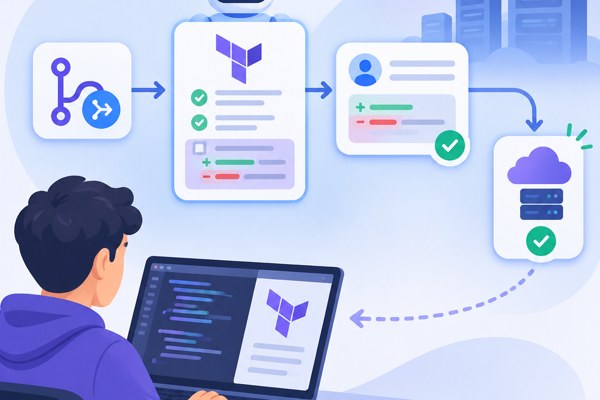
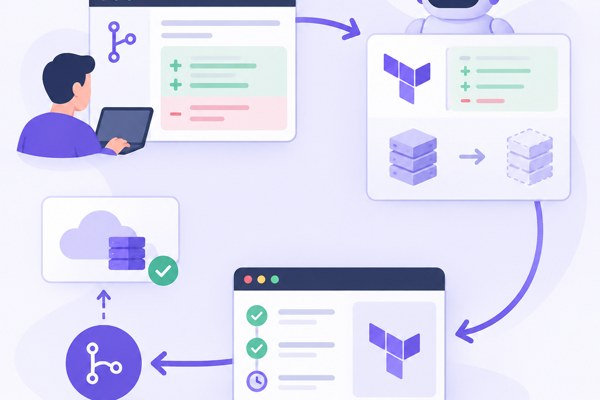
Digger embeds Terraform operations directly into your existing CI/CD system without needing separate platforms. It leverages pull request (PR) comments to manage terraform plan and apply commands, making infrastructure change management part of the developer workflow:
- Automatic plans on PRs: As soon as a developer opens or updates a PR containing Terraform changes, Digger triggers a terraform plan and posts the results as a comment.
- Comment-based Commands: Approvers can run apply or refresh commands simply by commenting on the pull request, eliminating the need to switch to a different interface.
- Controlled apply workflows: Supports applying changes automatically after a PR merge or manually via comments, providing flexibility between environments.
This approach reduces context switching, increases transparency, and speeds up infrastructure change approvals for teams working with IaC.
Key Features Beneficial for Non-Developers and Founders
Digger is a valuable tool not just for developers but also for marketers, founders, and other stakeholders who want reliability and visibility into infrastructure changes without deep Terraform expertise. It offers:
- Cost Estimation integration so you can see the potential cloud expenses before applying any changes.
- Policy Enforcement via Open Policy Agent (OPA), ensuring compliance and role-based access control within pull request workflows.
- Drift Detection scheduled via CI jobs that identify any state deviations between your declared Terraform configs and actual deployed infrastructure, sending alerts to relevant teams.
- Security Analysis: Built-in static analysis using Checkov identifies vulnerabilities or misconfigurations in Terraform code before deployment.
These features help non-developer stakeholders confidently participate in infrastructure review cycles and audits without disrupting workflows.
How to Get Started Using Digger
Integrating Digger into your Terraform CI/CD process involves straightforward steps:
- Install Digger: Add Digger’s integration into your existing GitHub Actions or GitLab CI pipeline by following the official setup guides on digger.dev.
- Configure Repositories: Set up Digger configuration files in your repos specifying Terraform directories, workspaces, and environment variables.
- Enable CommentOps: Use pull request comments to trigger terraform apply or refresh, leveling the management of infrastructure changes to your Git platform.
- Set Policies: Integrate OPA for compliance checks and RBAC as needed to enforce organizational policies.
- Schedule Drift Detection: Define regular CI jobs for drift detection to maintain infrastructure consistency.
The community edition is free and allows unlimited Terraform runs, perfect for startups or small teams looking for a self-hosted solution.
Best Practices to Maximize the Benefits
To get the most out of Digger, consider these actionable strategies:
- Keep Infrastructure Code Modular: Break down Terraform configurations into smaller modules and workspaces. Digger’s support for Terragrunt and multiple workspaces allows parallel testing and deployments.
- Automate Policy Enforcement: Use OPA policies in Digger to block risky changes or cost overruns automatically, reducing manual reviews.
- Enable Cost Visibility: Leverage cost estimation to inform budgeting decisions before applying infrastructure changes.
- Educate Your Team: Train non-developers like product managers and marketers to understand PR comments and triggers, encouraging collaboration and faster approvals.
- Use Apply-after-Merge for Production: Avoid manual applies in main branches by enabling the apply-after-merge workflow to enforce automated, auditable deployments.
Quick Checklist for Implementing Terraform Automation with Digger
- Install and configure Digger in your existing CI/CD pipeline
- Set up Terraform modules and workspaces effectively
- Enable PR comment automation for plan and apply commands
- Configure Open Policy Agent policies for governance
- Schedule regular drift detection CI jobs
- Activate cost estimation features for budgeting insight
- Train relevant team members on Digger PR workflows
- Implement apply-after-merge workflows for production stability
Conclusion and Next Steps
Digger provides a practical, open-source approach to automate Terraform CI/CD by integrating infrastructure management directly into pull request workflows. This lowers barriers for founders, marketers, and builders to participate confidently in infrastructure changes without special tooling separate from their development pipeline. Features like policy enforcement, cost estimation, and drift detection further enhance governance and reliability.
To start improving your Terraform automation today, visit the Development section of Techzog for guides on CI/CD best practices, and explore the official Digger documentation to integrate it seamlessly with your existing workflows.